
# Filters
Filters allow you to better scope the index queries for records you are looking for.
# Defining filters
Avo has two types of filters available at the moment Boolean filter and Select filter.
# Boolean Filter
You generate one running bin/rails generate avo:filter featured_filter creating a filter configuration file.
class FeaturedFilter < Avo::Filters::BooleanFilter
  self.name = 'Featured filter'

  def apply(request, query, values)
    query
  end

  def options
    {}
  end
end
Each filter file comes with a name, apply and options methods.
The name method lets you set the name of the filter.
The apply method is responsible for filtering out the records by giving you access to modify the query object. The apply method also gives you access to the current request object, and the passed values. The values object is a Hash containing all the configured options with the option name as the key and true/false as the value.
# Example values payload
{
  is_featured: true,
  is_unfeatured: false,
}
The options method defines the available values of your filter. They should return a Hash with the option id as a key and option label as value.
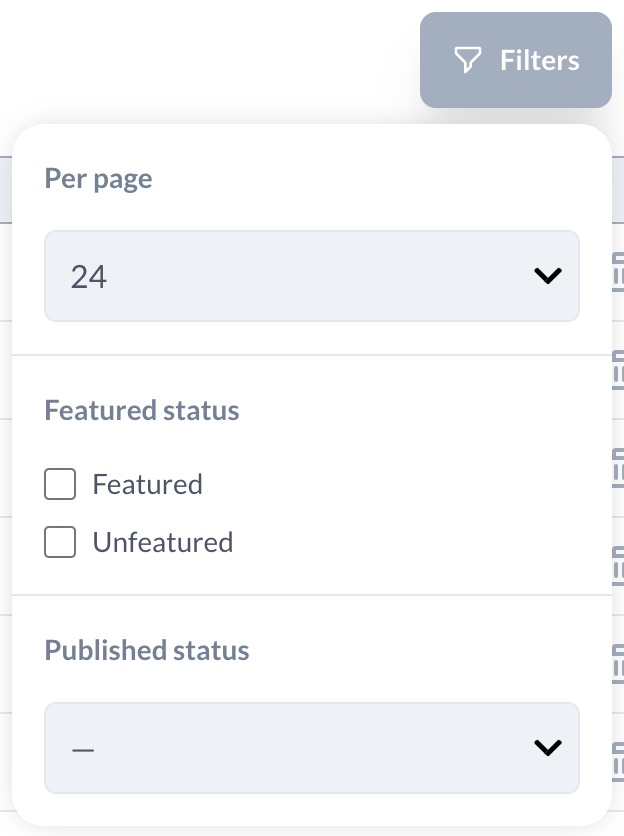
The finished filter might look something like this.
class FeaturedFilter < Avo::Filters::BooleanFilter
  self.name = 'Featured status'

  def apply(request, query, values)
    return query if values[:is_featured] && values[:is_unfeatured]

    if values[:is_featured]
      query = query.where(is_featured: true)
    elsif values[:is_unfeatured]
      query = query.where(is_featured: false)
    end

    query
  end

  def options
    {
      'is_featured': 'Featured',
      'is_unfeatured': 'Unfeatured',
    }
  end
end
# Default value
You can set a default value to the filter so it has a predetermined state on load. To do that return the state you desire it from the default method.
class FeaturedFilter < Avo::Filters::BooleanFilter
  self.name = 'Featured status'

  def apply(request, query, values)
    return query if values[:is_featured] && values[:is_unfeatured]

    if values[:is_featured]
      query = query.where(is_featured: true)
    elsif values[:is_unfeatured]
      query = query.where(is_featured: false)
    end

    query
  end

  def default
    {
      is_featured: true
    }
  end

  def options
    {
      'is_featured': 'Featured',
      'is_unfeatured': 'Unfeatured',
    }
  end
end
# Select Filter
Select filters are similar to Boolean ones. You generate one running rails generate avo:filter published_filter --select.
The biggest difference from the Boolean filter is in the apply method. You only get back one value attribute, which represents which entry from the options method is selected.
A finished, select filter might look like this.
class PublishedFilter < Avo::Filters::SelectFilter
  self.name = 'Published status'

  def apply(request, query, value)
    case value
    when 'published'
      query.where.not(published_at: nil)
    when 'unpublished'
      query.where(published_at: nil)
    else
      query
    end
  end

  def options
    {
      'published': 'Published',
      'unpublished': 'Unpublished',
    }
  end
end
# Default value
The select filter supports setting a default too.
class PublishedFilter < Avo::Filters::SelectFilter
  self.name = 'Published status'

  def apply(request, query, value)
    case value
    when 'published'
      query.where.not(published_at: nil)
    when 'unpublished'
      query.where(published_at: nil)
    else
      query
    end
  end

  def default
    'published'
  end

  def options
    {
      'published': 'Published',
      'unpublished': 'Unpublished',
    }
  end
end
# Multiple select filter
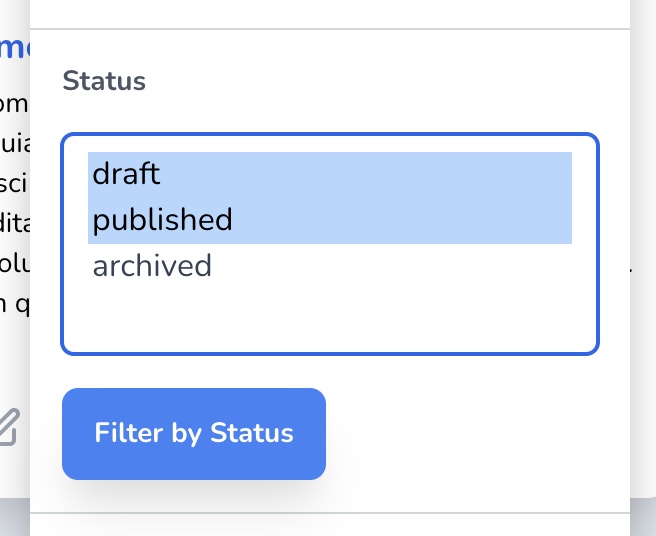
You may also use a multiple select filter.
class PostStatusFilter < Avo::Filters::MultipleSelectFilter
  self.name = "Status"

  def apply(request, query, value)
    query.where(status: value.map(&:to_i))
  end

  def options
    Post.statuses.invert
  end
end
# Dynamic options
The select filter can also take dynamic options:
class AuthorFilter < Avo::Filters::SelectFilter
  self.name = 'Author'

  def apply(request, query, value)
    query = query.where(author_id: value) if value.present?
    query
  end

  def options
    Author.select(:id, :name).each_with_object({}) { |author, options| options[author.id] = author.name }
  end
end
# Text Filter
You can also add complex text filters to Avo by running rails generate avo:filter name_filter --text.
class NameFilter < Avo::Filters::TextFilter
  self.name = "Name filter"
  self.button_label = "Filter by name"

  def apply(request, query, value)
    query.where('LOWER(name) LIKE ?', "%#{value}%")
  end
end
# Registering filters
To add an filter to one of your resources, you need to declare it on the resource using the filter method.
class PostResource < Avo::BaseResource
  self.title = :name
  self.search = :id

  field :id, as: :id
  # other fields

  filter PublishedFilter
end